
PowerMTA 6 — the industry standard for high-volume email
The world’s largest email services run on PowerMTA. It’s an MTA server that doesn’t just send emails but runs a deliberate delivery strategy: separate rules per mailbox provider, automatic throttling on complaints and full control over your IP reputation.
The engine that gets emails to the inbox
An MTA (Mail Transfer Agent) is a transport server: it takes your campaign’s emails and delivers them to Gmail, Mail.ru, Yahoo and thousands of other domains. PowerMTA is a commercial MTA that has been the industry standard for two decades: the world’s largest ESPs and email platforms are built on it.
Industrial performance
Millions of emails an hour from one server — no clusters, no complex schemes. No open-source MTA matches this sending density per unit of hardware.
Surgical control
Virtual MTAs, separate queues for each recipient domain and individual rules per mailbox provider: how many connections, how many emails and at what speed.
A strategy, not “send and forget”
When a provider starts returning refusals, PMTA drops into a gentle BACKOFF mode itself, protects the IP reputation and returns to full speed once acceptance recovers.
Important: PowerMTA is a separate product; it’s not part of the Protosender, Interspire and Mumara bundles. Mailing scripts can work through any SMTP, but on someone else’s servers you hit limits, pay per volume and depend on other people’s reputation. Your own PowerMTA removes every limit — your IPs, your rules, your deliverability control. It’s with PowerMTA that email scripts reach their full power.
Why bulk senders choose PMTA 6 specifically
Every one of these features is about the same thing: get the maximum of your emails to the inbox without burning your IPs and domains.
Virtual MTAs (vMTA)
Each IP + sender-domain pairing is a separate virtual MTA with its own reputation and rules. Streams are isolated: a problem in one pool doesn’t touch the others.
NORMAL / BACKOFF modes
When a provider starts refusing, PMTA automatically shifts the queue into a gentle mode: it lowers the pace, changes the retry schedule and returns to normal once acceptance recovers.
A queue per domain
Gmail, Mail.ru, Yahoo and every corporate domain — each in its own queue. A slow or problematic recipient doesn’t hold up the whole campaign.
Rules per provider
Max connections, emails per connection, speed, TLS — individually per mailbox provider. What Gmail likes needn’t suit Mail.ru — PMTA accounts for that.
On-the-fly DKIM signing
Every email is signed at send time: separate keys per domain, support for modern algorithms. The foundation for passing Gmail and Yahoo checks.
Cold vMTA — warming up new IPs
New addresses are brought online in measured doses, on a schedule: capped volumes grow automatically until the IP builds reputation. In 6.0 the warm-up became even safer.
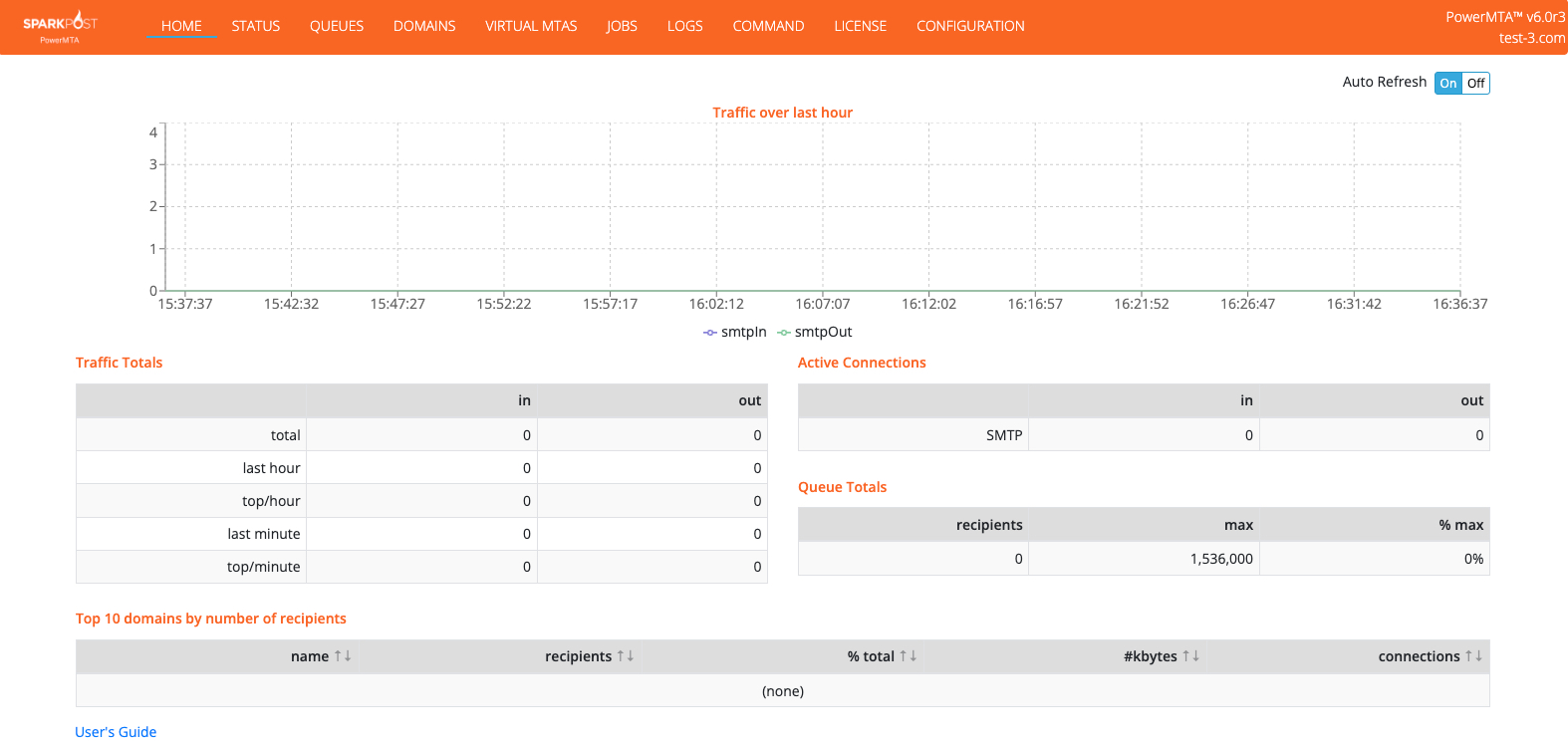
Web monitoring console
Queues, connections, vMTA statuses, deferrals and errors — in real time, in the browser. Everything is visible: from the big picture to a specific domain.
An accounting log of everything
Every delivery, bounce and deferral is recorded in detailed logs (CSV/JSON). A full picture for analytics — and in 6.0 events also stream to real-time webhooks.
Smart retries and bounces
PMTA distinguishes temporary refusals (4xx) from permanent ones (5xx): the first are retried on schedule, the second are classified immediately — invalid addresses don’t hurt reputation.
All your sending on one screen
PMTA is not a black box: the built-in web console shows queues, connections and the state of every vMTA in real time.
PMTA 6 doesn’t send head-on — it sends by strategy
Emails are sorted into per-domain queues, each mailbox provider gets its own pace, and PMTA reacts to refusals itself — faster than an administrator would notice.
← scroll the diagram horizontally →
This is PMTA’s strength: it doesn’t “hammer a closed door”. A refusal from a provider instantly moves that pool into BACKOFF, the IP reputation is preserved, and once acceptance recovers sending returns to full speed by itself.
PMTA is a professional’s tool. Protosender makes it simple
PowerMTA is managed through a text config and requires understanding vMTAs, delivery policies, DNS and DKIM. A configuration mistake is costly — up to burned IPs. Usually people hire a deliverability administrator for this. Or they take Protosender — the only one of our scripts with a native PMTA management module.
- The config is generated from the interface — vMTAs, pools, DNS records and DKIM keys are created by the script, not an administrator
- One-click upload to the server — Protosender delivers the configuration to PMTA and restarts the service itself
- Monitoring without the console — queues, vMTA statuses and blocks are visible right in the mailing interface
- Automatic reaction to problems — a burning pool is paused and sending is redistributed to healthy IPs
- Warm-up strategies — new IPs and domains are brought online on managed plans with spam control
PowerMTA or MailerQ — which MTA is yours?
Both are top-tier commercial MTAs, and we install and configure both. The difference is philosophy: PMTA is about maximum power through finely tuned rules, MailerQ is about flexible on-the-fly control.
PowerMTA 6
the bulk email standard since 1999
MailerQ 5.16.2
an MTA with real-time control
In short: for bulk email through Protosender, Interspire or Mumara take PowerMTA — the integrations are native, the performance is a benchmark, and the industry’s experience works for you. Building your own platform with dynamic routing — look at MailerQ. Not sure — write to us, we’ll match it to your task and volumes.
Two PowerMTA versions — which is yours?
We supply both current branches. The fifth is the industry’s longtime workhorse. The sixth is a new generation whose main improvements are built specifically around deliverability.
The most stable version
The 5.0 branch has run in production at thousands of senders for years — predictable, battle-tested, reliable. It has the entire PMTA core it’s chosen for:
- Virtual MTAs and IP pool isolation
- NORMAL / BACKOFF modes and smart retries
- Per-domain queues and per-provider rules
- On-the-fly DKIM, cold vMTA, web console, accounting
- Covers 90% of bulk email tasks
Maximum deliverability
Everything in 5.0r8 — plus six key upgrades
- Automatic MX Rollups — domains sharing an MX group under one policy by themselves: no gaps in the config, steady inbox with no manual routine
- Smart bounce classification — fewer empty retries, invalid addresses don’t burn IP reputation
- Safe warm-up — cold vMTA accounts for rollup queues: new IPs reach volume without breakdowns or overdoses
- REST API for vMTA — pools and IP segmentation are managed programmatically, from scripts and panels
- Real-time webhooks — delivery and bounce events reach your analytics instantly, in parallel streams
- Modern security — OpenSSL 3.0.8, FIPS 140-2, HAProxy protocol support
How to choose: if you need a reliable MTA for classic bulk sending — take 5.0r8. If you’re squeezing out maximum deliverability, warming up many new IPs or building automation via API — take 6.0r3: three of its six upgrades work directly on the inbox rate.
Choose your PowerMTA version
Both versions are ready-to-run builds with video instructions. A one-time payment, no subscriptions or renewals.
one-time payment · no subscription
- PowerMTA 5.0r8 installer — installs on your server in minutes
- Video setup guide — from a clean server to the first send
- Video management guide — vMTAs, queues, monitoring, logs
- The full PMTA core: modes, queues, DKIM, warm-up
one-time payment · no subscription
- PowerMTA 6.0r3 installer — the latest version
- Video guides for setup and management
- MX Rollups + smart bounces + safe warm-up — upgrades that work directly on the inbox rate
- REST API and real-time webhooks — ready for automation and integrations
- OpenSSL 3 · FIPS 140-2 · HAProxy
No server, IPs or time to figure it out? We’ll deploy PowerMTA turnkey: server, networking, DNS, DKIM, warm-up and the link-up with your mailing script — write to us. Payment in USDT via a secure checkout page. Questions about choosing a version — ask before buying, we reply fast.
Dozens of PMTA nodes? Meet MTA-Hub
One PowerMTA is easy to run from Protosender. But when servers, IPs, domains and PMTA nodes number in the dozens and hundreds, you need a separate command center. That’s MTA-Hub — our SMTP infrastructure management platform.
Infrastructure inventory
A single registry of servers, IPs, domains and virtual MTAs: the type, role and status of every unit — nothing gets lost in spreadsheets.
Prometheus monitoring
Traffic, queues, connections, errors and latency across all nodes at once — with alerts before a problem becomes visible.
Configurations under control
Templates, version comparison, pre-deploy validation, deployment and rollback — with a full audit log.
Controlled warm-up
Metric-driven warm-up plans with pre-flight checks: an IP goes to production only when the numbers confirm it.
Pool export via API
Ready SMTP/MTA pools export straight into Protosender: build the infrastructure in the Hub, and the mailer gets it in one click.
AI infrastructure audit
A risk assessment of the whole setup and plain-language recommendations: what’s burning reputation, where the bottleneck is, what to fix first.
MTA-Hub is a separate MailCore product. Tell us about your infrastructure — we’ll show how it brings order to it.
More about MTA-Hub