
MailerQ — the MTA you control in real time
A high-performance MTA on a RabbitMQ architecture: limits, IP pools and routing change from the web console on the fly — with no restarts or downtime. Ideal for clusters, custom platforms and anyone who wants to see and control every queue.
An MTA built around message queues
MailerQ is a commercial MTA server built on the RabbitMQ queue broker: every email is a message in a queue that you can manage programmatically. Inject via SMTP, REST API or straight into AMQP, deliver by flexible rules, and results come back to a queue for your analytics.
Live control
Limits, IP pools, pauses and routing change from the web console and apply instantly — with no MTA restart and no lost queues. None of that “edit the config and reboot”.
Full transparency
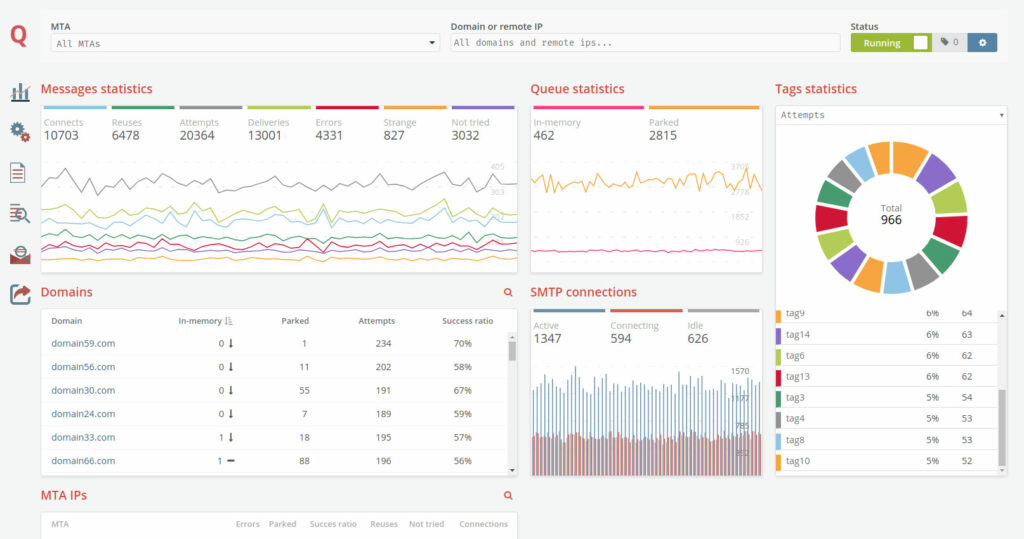
Real-time stats by IP, domains and tags, an SMTP connection monitor and even a preview of emails in processing — you see the system through and through.
Clusters and fault tolerance
RabbitMQ queues scale across several machines: high availability out of the box — a node drops, the cluster keeps sending. For clouds there’s NAT mapping of external IPs.
Important: MailerQ is a separate product; it’s not part of the Protosender, Interspire and Mumara bundles. Mailing scripts connect to it via SMTP or API — and get what no third-party SMTP service can offer: your own IPs, your own limits and full deliverability control on your infrastructure.
Flexibility classic MTAs don’t have
Every MailerQ setting is live: change it via the console or API and it takes effect at once. Here’s the core of the arsenal.
Real-time dashboard
Live stats on attempts, results, queues and errors — by instance, IP, target system and tag. Widgets are configurable to your needs.
Throttling per IP + domain
Emails per minute, connections per minute, bytes, max active connections and SMTP timeouts — for each “our IP → their domain” pairing.
Flood & Response patterns
The server returned “rate limited” — MailerQ pauses the stream itself and resumes at a lower speed. Any provider response can change IPs, tags and delivery behavior. Masks and regex supported.
IP warm-up schedules
A schedule for the number of days you need: which limits apply on day 1, 5, 15. New IPs are brought online automatically — no manual control of each step.
Live IP Reload
Adding, grouping and warming up IP addresses without reloading the MTA. Pools expand mid-campaign.
Rewrite rules — routing
Triggers by IP, domain or tag with conditions: change the IP, route to a smarthost, rewrite properties — messages are rerouted on the fly.
Inject any way
SMTP, REST API (JSON), straight into RabbitMQ, a spool directory or the CLI — MailerQ fits into any infrastructure, from a mailing script to microservices.
DKIM and ARC
Signature key management: domain, selector, extra headers, signature type. DKIM and ARC — the foundation for passing mailbox-provider checks.
High Availability
Message queues scale across several machines: a fault-tolerant cluster where a node dropping doesn’t stop sending.
Nine tools that your delivery is built from
These are MailerQ’s built-in modules — each managed from the console and applied on the fly. We’re preparing a detailed write-up of each on our blog.
Delivery throttling
Email Throttling
Limits for specific domains: how many emails, connections and bytes per minute each provider gets and how many connections to keep open.
Warm-up schedules
Email Throttling Schedules
A day-by-day volume ramp: set the schedule — MailerQ raises the pace toward a domain itself while the IP builds reputation. Warm-up with no manual control.
Overload reaction
Flood Patterns
The provider returned “rate limited” — the stream pauses automatically and resumes at a lower speed. Patterns: substrings, masks, regex.
Response actions
Response Patterns
Any server response is a trigger: add or remove an IP, retry or reject delivery, change tags. The MTA adapts to providers by itself.
Rewrite rules
Rewrite Rules
An email’s properties change right after it’s taken from the queue: a change of sending IP, redirect to a smarthost, conditional edits — before processing begins.
Suppression list
Suppression List
A stop list of addresses and domains: typos, non-existent mailboxes and problem recipients are rejected before a connection is even attempted — reputation stays intact.
Paused deliveries
Paused Deliveries
A manual pause of the stream by IP, domain or tag — precise and instant, with no cluster reload. Ideal for incident reviews.
Forced errors
Forced Errors
Selected messages get a custom error code returned — a permanent refusal without sending. An emergency stop and a way to test bounce handling.
IP Pools
IP Pools
Named address groups for different jobs: shared, dedicated, transactional. The pool is specified at injection — client and campaign traffic doesn’t mix.
The MailerQ section of our blog is on the way: detailed articles on each module, with configuration examples for real-world mailing tasks.
A console where everything is live
The MailerQ Management Console is more than monitoring: every chart is clickable, every setting changes right here and applies instantly.
All delivery is queues you control
Emails become RabbitMQ messages, the MailerQ core delivers them by live rules, and the console changes any setting on the fly. The result of every delivery comes back to a queue — straight into your analytics.
← scroll the diagram horizontally →
MailerQ’s key difference: the whole system is message queues. Your platform can publish emails straight into RabbitMQ and pull results from a neighboring queue — the MTA becomes part of your code, not a black box beside it.
Two MailerQ versions — which is yours?
We supply both current builds. 5.14.4 is the battle-tested branch on which SMTP clusters run reliably. 5.16.2 is the fresh branch with an emphasis on injection reliability and diagnostic accuracy.
A stable base for clusters
The 5.14 branch has long been proven in production — predictable and reliable. MailerQ’s whole signature arsenal is already here:
- Throttling, flood & response patterns, rewrite rules
- IP warm-up schedules and live address reload
- Management Console, REST API, SMTP/AMQP injection
- RabbitMQ clusters and high availability
- A workhorse for classic volumes
Reliability and precise diagnostics
Everything in 5.14.4 — plus the 5.15 and 5.16 branch upgrades
- Guaranteed injection — SMTP returns “250 queued” only after the email is actually written to RabbitMQ: no email is lost on failures
- Accurate parsing of provider responses — fixed code parsing for Web.de, GMX, Exim and others: bounces are classified correctly and the statistics don’t lie
- A new DNS subsystem — faster and more reliable domain resolution at scale
- Flexible RabbitMQ queues — fine-tuning of delayed and temporary queues, TTL, retry routing
- Stability under load — race conditions in the core and web console eliminated
- International addresses — correct UTF-8 handling in delivery reports
How to choose: if you need a battle-tested MTA for a classic SMTP cluster — take 5.14.4. If it matters not to lose a single email, to get honest bounce diagnostics and the latest fixes — take 5.16.2: it’s the current branch the vendor is developing.
MailerQ or PowerMTA 6 — which MTA is yours?
Both are top-tier commercial MTAs, and we install and configure both. In short: MailerQ is about flexibility and live control, PowerMTA is about maximum density and finely tuned rules.
MailerQ
delivery control in real time
PowerMTA 6
the bulk email standard since 1999
In short: if you’re building a platform, cluster or service where delivery is driven by your code and a web console — you’re already on the right page: MailerQ. If you need maximum sending density from one server and a native link-up with Protosender, Interspire or Mumara — look at PowerMTA 6. Not sure — write to us, we’ll match it to your task and volumes.
Dozens of MTA nodes? Meet MTA-Hub
One MailerQ is easy to run from its own console. But when the nodes — MailerQ and PowerMTA — together with servers, IPs and domains number in the dozens and hundreds, you need a separate command center. That’s MTA-Hub — our SMTP infrastructure management platform.
Infrastructure inventory
A single registry of servers, IPs, domains and virtual MTAs: the type, role and status of every unit — nothing gets lost in spreadsheets.
Prometheus monitoring
Traffic, queues, connections, errors and latency across all nodes at once — with alerts before a problem becomes visible.
Configurations under control
Templates, version comparison, pre-deploy validation, deployment and rollback — with a full audit log.
Controlled warm-up
Metric-driven warm-up plans with pre-flight checks: an IP goes to production only when the numbers confirm it.
Pool export via API
Ready SMTP/MTA pools export straight into Protosender: build the infrastructure in the Hub, and the mailer gets it in one click.
AI infrastructure audit
A risk assessment of the whole setup and plain-language recommendations: what’s burning reputation, where the bottleneck is, what to fix first.
MTA-Hub is a separate MailCore product. Tell us about your infrastructure — we’ll show how it brings order to it.
More about MTA-HubChoose your MailerQ version
Both versions are ready-to-run builds with video guides. A one-time payment, no subscriptions or renewals.
one-time payment · no subscription
- MailerQ 5.14.4 installer — together with RabbitMQ, on your server
- Video setup guide — from a clean server to the first send
- Video management guide — console, queues, pools, throttling
- The whole arsenal: patterns, warm-up, rewrite rules, REST API
one-time payment · no subscription
- MailerQ 5.16.2 installer — the freshest build the vendor is developing
- Video guides for setup and management
- Guaranteed injection + honest bounce diagnostics — upgrades that protect your emails and reputation
- Flexible queues and a new DNS subsystem — reliability at scale
- All the 5.15 and 5.16 branch fixes
No server, IPs or a team for the cluster? We’ll deploy MailerQ turnkey: server, RabbitMQ, networking, DNS, DKIM, warm-up and integration with your script or platform — write to us. Payment in USDT via a secure checkout page. Questions about choosing a version — ask before buying, we reply fast.